 All posts
A perfect function

Today I want to explore how to design nice functions. In the current year 2026 where people tend to focus on results they often pay little attention to how their functions look. I however believe that having a solid foundation underneath whatever you are building is an important part of software development and so overlooking function design is a mistake.
The specific qualities of good functions appear elusive at first. It's tempting to be overly restrictive and say "only pure functions are good" or to give up trying to come up with principles and land on "I know a good function when I see it". Instead in this blog post I will propose a set of principles to follow that actually result in meaningfully better functions.
Principle #1 - Solve the problem
That is the most important quality of a function. It may seem obvious but I assure you it's not. It's one of the hardest things to get right and often requires multiple rounds of iterations and changing the point of view to arrive on a satisfying solution.
To illustrate this let's pick an example problem to solve. We'll design an API for drawing debug geometry in the context of a 3D graphics engine.
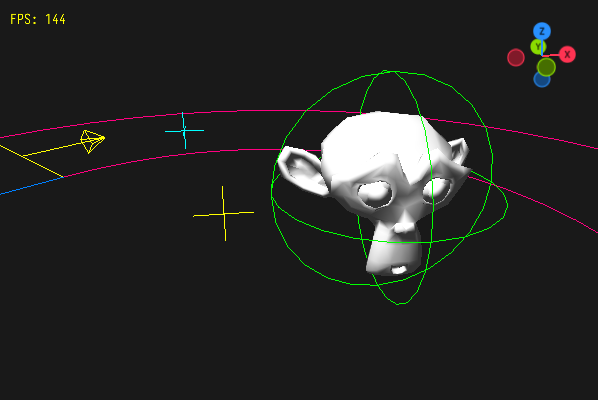
Consider the following function. Does it solve the problem?
Game_Object create_debug_sphere(f32 radius);First let's look at how the function would actually be called:
Game_Object debug_sphere = create_debug_sphere(40);
debug_sphere.pos = (Vec3){10, 20, 30};
debug_sphere.material.color = COLOR_RED;
add_child(root_object, debug_sphere);
It looks like there's a bit of additional work involved in actually having our debug sphere show up. But that's not the end of our worries. We need to actually keep track of it, because at some point we might want to dispose of it. So at some point in the future we might need to remove_child(root_object, debug_sphere).
A potential mechanism for automatically getting rid of the debug sphere would be to attach it to some object in our world, e.g. to a bullet being fired so that when the bullet is destroyed our debug sphere dies with it.
The design of create_debug_sphere also seems to imply that once the object is in our scene it becomes visible. That might not be desired but maybe the debug sphere has some DEBUG flag which allows our renderer to show it conditionally? But then, we might want different kinds of debug objects and we might not want to show them all or none, but rather only show bounding boxes or only show velocity vectors.
It also seems like we would still need to write a dedicated render_debug_sphere somewhere in our renderer. What if we wanted different kinds of debug objects? I can imagine create_debug_aabb, create_debug_arrow, etc, but then they would also need their dedicated render_debug_* functions and so the work required of us multiplies.
All in all I would say while the function gets us closer to our goal of a debug drawing API it doesn't solve the problem, because we still need the actual drawing to happen somewhere else and we get tasked with additional problems such as managing lifetime and visibility of our debug objects.
Let's try to address the concerns one by one. First on the menu is the lifetime. Because this functionality is going to be used for debugging the user doesn't want to do bookkeeping. If we made it so that our object automatically dies after one frame the user no longer has to worry about its lifetime. This not only changes our function name slightly to communicate the new behaviour, but also allows us to easily support a creating different categories of debug objects.
if (debug_options.show_hitboxes) {
  Game_Object hitbox = create_temp_sphere(grenade.size);
  hitbox.pos = grenade.pos;
  hitbox.material.color = COLOR_RED;
  add_child(root_object, hitbox);
}
if (debug_options.show_area_of_effect) {
  Game_Object aoe = create_temp_sphere(grenade.blast_radius);
  aoe.pos = grenade.pos;
  aoe.material.color = COLOR_BLUE;
  add_child(root_object, aoe);
}
The second thing we might notice is that now that the debug objects automatically die after a single frame the trick of attaching them to different objects to inherit their lifetime is not needed as we're going to be attaching to the root object always. Also the pos and color seem to be modified always. Let's update the function signature with this knowledge:
// new signature
void spawn_temp_sphere(Vec3 pos, f32 radius, Color color);

// new use
if (debug_options.show_hitboxes) {
  spawn_temp_sphere(grenade.pos, grenade.size, COLOR_RED);
}
if (debug_options.show_area_of_effect) {
  spawn_temp_sphere(grenade.pos, grenade.blast_radius, COLOR_RED);
}
We're getting closer. Now let's address the second concern: we need a separate routine to later render our debug geometry. Fortunately the fix is extremely simple, but requires a bit of a shift in perspective. Instead of creating objects that are later rendered we can combine the two. We could arrive at spawn_and_render_temp_sphere, but notice that the sphere would never be used for anything ever again. So instead we can just draw_debug_sphere. The code looks almost exactly the same, but there is no separate draw step later in the process.
if (debug_options.show_hitboxes) {
  draw_debug_sphere(grenade.pos, grenade.size, COLOR_RED);
}
if (debug_options.show_area_of_effect) {
  draw_debug_sphere(grenade.pos, grenade.blast_radius, COLOR_RED);
}
Finally let's address the hidden problem of sister functions. We can of course create draw_debug_aabb and draw_debug_arrow and likely we should. But notice the problem with this set of functions:
void draw_debug_sphere(Vec3 pos, f32 radius, Color color);
void draw_debug_aabb(Vec3 pos, Vec3 half_extent, Color color);
void draw_debug_arrow(Vec3 from, Vec3 to, f32 size, Color color);
What if the user would like to draw a different debug shape? Maybe a circle or a square? Maybe a hatch mark? We can keep extending the list but we'll never implement every possible shape. Instead we have identified a hole in our function design that's not visible if we look at it in isolation.
Principle #2 - Be implementable
When authoring functions there is often the desire to provide high level functionality so that the callers never have to worry about implementation details. It's a noble goal and using an API like that feels truly magical at the beginning. But the strength of an API lies not in how easy it is to get started but how easy it is to deliver the final product.
If you skip levels of abstraction when designing an API you're forcing your users to reimplement parts of the functionality you provide.
Coming back to the debug drawing example. This functionality is likely implemented in one of two ways. Either it is software rendered in which case we have a way to draw a single pixel, a way to draw a line of pixels then we have a 3d camera transform and finally we use all that to create a debug sphere out of lines. Alternatively it is gpu accelerated in which case we have the graphics driver, some temporary buffer in which we assemble geometry into a way to send that buffer to the gpu to draw and finally our code that pushes the debug sphere geometry into that buffer.
It is likely that the lowest level: a single pixel or the gpu driver is already accessible to the user of our draw_debug_sphere function. But the intermediate steps aren't exposed. And so should the user want to draw custom shapes they need to re-implement the intermediate parts of the pipeline.
To combat this the best way is to structure our api is to pick a primitive around which all higher level functionality is built. In the case of the debug drawing a line the most natural candidate. All the debug shapes we want to draw are ultimately made of lines (yes, even the circles, they are made of small segments). And when we expose our primitive then our users are no longer hostage to the specific set of higher level functionality we decided to provide.
This is what I mean by "be implementable". For high level functionality the user should always have an easy path to implement it in their own way without having to stop using the entire module.
For our current example the fix is simple, we just add the missing primitive:
void draw_debug_sphere(Vec3 pos, f32 radius, Color color);
void draw_debug_aabb(Vec3 pos, Vec3 half_extent, Color color);
void draw_debug_arrow(Vec3 from, Vec3 to, f32 size, Color color);
// The missing function
void draw_debug_line(Vec3 from, Vec3 to, Color color);
Principle #3 - Be easy to call
Some time has passed and our API has received some new functionality. We can now specify line thickness, make the lines render in front of everything and change line style. Our function has grown quite a bit:
typedef enum Debug_Line_Style {
  DEBUG_LINE_STYLE_INVALID,
  DEBUG_LINE_STYLE_SOLID,
  DEBUG_LINE_STYLE_DASHED,
  DEBUG_LINE_STYLE_DOTTED,
} Debug_Line_Style;

void draw_debug_sphere(
  Vec3 pos,
  f32 radius,
  Color color,
  f32 line_thickness,
  bool do_depth_test, // if false it is always on top
  Debug_Line_Style line_style
);

// Let's see how we call it
draw_debug_sphere(
  (Vec3){10, 20, 30}, 40,
  COLOR_RED, 1, true, DEBUG_LINE_STYLE_SOLID
);
That is a lot of parameters and it makes the callsite hard to decipher, especially the out of context 40, 1 and true.
An often prescribed solution to the problem of many parameters is replacing them with a single object parameter. Let's try this approach.
typedef struct Debug_Sphere_Options {
  Vec3 pos;
  f32 radius;
  Color color;
  f32 line_thickness;
  bool do_depth_test; // if false it is always on top
  Debug_Line_Style line_style;
} Debug_Sphere_Options;

void draw_debug_sphere(Debug_Sphere_Options options);
Unfortunately I don't think this is the panacea everyone claims, at least not if done in isolation. Because our function call, while a bit more readable, got actually quite a bit more cumbersome:
draw_debug_sphere((Debug_Sphere_Options){
  .pos = {10, 20, 30},
  .radius = 40,
  .color = COLOR_RED,
  .line_thickness = 1,
  .do_depth_test = true,
  .line_style = DEBUG_LINE_STYLE_SOLID,
});
So what is the solution? Well, defaults! In languages that support defaults we could stop there, but C actually only supports a single default value - zero. So, we need to restructure our arguments to take advantage of that.
Let's go through our arguments one by one to see what can be done:
pos: We have it easy here.(Vec3){0, 0, 0}is already a sensible value, because it corresponds to the world origin.radius: Is the only one we cannot make optional. We don't have the ability to reinterpret a radius of zero as any other value because we lack the information about the scale of the world. Is a radius of1sensible? What if this is a planetary simulation and1actually means one meter. Or this is a game about bacteria and one meter is larger than the entire game world. So no default forradius.color: We are lucky again. In most color representations a value of0means black, and I think that is a sensible default value. Most likely the user will want to provide some override but that's ok.line_thickness: It seems like we're in the same boat asradiusbut we're not. If we assume thatline_thicknessis in pixels then the value of zero is nonsensical. That allows us to safely reinterpret it as1as we can be sure that no one will actually want to draw a line of thickness zero. If they wish to they can simply not draw it instead.do_depth_test: We would like the default to betrue, but we cannot reinterpret0astruesince0already meansfalse. Fortunately we can simply invert the parameter to beno_depth_testor if we want to convey intentrender_in_front.line_style: Recall that our enum's zero value isDEBUG_LINE_STYLE_INVALID. The intention was likely to force the user to pick a value, but now we actually want to pick a default. I thinkDEBUG_LINE_STYLE_SOLIDis a fine choice, so we have to simply remove theDEBUG_LINE_STYLE_INVALIDfrom the enum. Also, isn't it weird thatline_styleandline_thicknessaren't close to each other in the list of options. Let's fix that.
With all those changes let's examine our new function signature and the new call site:
typedef enum Debug_Line_Style {
  DEBUG_LINE_STYLE_SOLID,
  DEBUG_LINE_STYLE_DASHED,
  DEBUG_LINE_STYLE_DOTTED,
} Debug_Line_Style;

typedef struct Debug_Sphere_Options {
  Vec3 pos;
  f32 radius;
  Color color;
  f32 line_thickness;
  Debug_Line_Style line_style;
  bool render_in_front;
} Debug_Sphere_Options;

draw_debug_sphere(Debug_Sphere_Options options);

// And the call site
draw_debug_sphere((Debug_Sphere_Options){
  .pos = {10, 20, 30},
  .radius = 40,
  .color = COLOR_RED,
});
Our function is now a lot easier to call! We can do better still, but we need to move to the next principle to do that.
Principle #4 - Be familiar
I believe great functions are never stand alone. They are part of great APIs. And if you learn a part of a great API the rest naturally follows from what you already know. Let's look at our API right now:
typedef enum Debug_Line_Style {
  // ...
} Debug_Line_Style;

typedef struct Debug_Line_Options {
  // ...
} Debug_Line_Options;
void draw_debug_line(Debug_Line_Options options);

typedef struct Debug_Sphere_Options {
  // ...
} Debug_Sphere_Options;
void draw_debug_sphere(Debug_Sphere_Options options);

typedef struct Debug_AABB_Options {
  // ...
} Debug_AABB_Options;
void draw_debug_aabb(Debug_AABB_Options options);

typedef struct Debug_Arrow_Options {
  // ...
} Debug_Arrow_Options;
void draw_debug_arrow(Debug_Arrow_Options options);
On one hand you might say it's consistent. Every function takes a set of options and they definitely do follow some sort of naming convention. But if you compare it to how our api looked before we introduced all those options I think it was way nicer. So how do we go back?
For starters we might notice that some options are common between our functions and some are not. When we extract them we can further notice that they can very well just take the place of the color parameter from before. Here's our api after the change:
typedef enum Debug_Line_Style {
  // ...
} Debug_Line_Style;

typedef struct Debug_Options {
  Color color;
  f32 line_thickness;
  Debug_Line_Style line_style;
  bool render_in_front;
} Debug_Options;

void draw_debug_line(
  Vec3 from, Vec3 to, Debug_Options options
);
void draw_debug_sphere(
  Vec3 pos, f32 radius, Debug_Options options
);
void draw_debug_aabb(
  Vec3 pos, Vec3 half_extent, Debug_Options options
);
void draw_debug_arrow(
  Vec3 from, Vec3 to, f32 size, Debug_Options options
);
Second, in the previous iteration everything in our module was named draw_debug_*, but now we also have Debug_Line_Style and Debug_Options. It is time to give our module some identity by assigning it a namespace. In some languages this is a built-in feature but in C we make do with what we have. Also, since the namespace name will be repeated often we should pick something short. debug_graphics_*? How about dg_*? I like it so let's go with it. In my current codebase I went with im_* for "immediate mode (drawing)".
Also, this technique isn't unique to C. In C++ or Rust your function would be prefixed with dg::* and in Python or JavaScript with dg.*. The namespace being part of the function name is C specific, but it being part of the function's call site is universal.
typedef enum DG_Line_Style {
  DG_LINE_SOLID,
  DG_LINE_DASHED,
  DG_LINE_DOTTED,
} DG_Line_Style;

typedef struct DG_Options {
  Color color;
  f32 line_thickness;
  DG_Line_Style line_style;
  bool render_in_front;
} DG_Options;

void dg_draw_line(
  Vec3 from, Vec3 to, DG_Options options
);
void dg_draw_sphere(
  Vec3 pos, f32 radius, DG_Options options
);
void dg_draw_aabb(
  Vec3 pos, Vec3 half_extent, DG_Options options
);
void dg_draw_arrow(
  Vec3 from, Vec3 to, f32 size, DG_Options options
);
I like this a lot better, but there is an additional step we can take. This one is a bit controversial and doesn't work everywhere but I think for debug drawing it is a good fit. We can make the options global (or thread-local, but that's an implementation detail if we want to support multithreading), and then we don't have to pass the options around.
typedef enum DG_Line_Style {
  DG_LINE_SOLID,
  DG_LINE_DASHED,
  DG_LINE_DOTTED,
} DG_Line_Style;

void dg_set_color(Color color);
void dg_set_line_thickness(f32 thickness);
void dg_set_line_style(DG_Line_Style style);
void dg_render_in_front(bool active);
void dg_reset(void);

void dg_draw_line(Vec3 from, Vec3 to);
void dg_draw_sphere(Vec3 pos, f32 radius);
void dg_draw_aabb(Vec3 pos, Vec3 half_extent);
void dg_draw_arrow(Vec3 from, Vec3 to, f32 size);
This is nice, because it allows us to configure behaviour of a subroutine from the parent function. We could set the color and then iterate through every object and call it's object_draw_bounding_box function and we don't have to pass any extra parameters around. We can also specify a global line thickness, instead of having to repeat it everywhere if we don't like the default.
To override an option only for the duration of a specific call we could introduce dg_push_context() and dg_pop_context() but honestly, I would only go there if that actually becomes necessary.
It's important to mention that APIs that rely too much on global state tend to not be that great because the management of global state can become a burden in its own way and then we're violating principle #1 - we're not solving the problem, we're replacing it with another problem. Again, I think for the use case of debug drawing it is nice, but you just have to look at OpenGL to see how too much global state can cause a huge headache.
Before we move further I would like you to notice how improving on principle #4 - being familiar has also improved our principle #3 - being easy to call. Not only the function signatures got shorter, but also since we now have a proper module namespace our editor can easily autocomplete all the names in our module for us!
Principle #5 - Fail gracefully
When talking about a function being easy to call we haven't talked about setup and cleanup. It is common for real world callsites to look like this:
Special_Object* so = obtain_special_object(69)
if (so != NULL) {
  special_object_prepare(so, SO_MODE_ACTIVE)
  // yes I know there is no try-catch in C
  // that's one of the reasons I like it
  try {
    the_actual_function(so, 1234, false, NULL);
  } catch (error) {
    log("Error: ", error);
  }
  special_object_release(so);
} else {
  log("Error: cannot create special object");
}
There is a lot of setup and cleanup involved in all of this. Sometimes we can't help with the setup. In case of our debug drawing API you need to create a window, obtain a graphics context and initialize some low level graphics api. There isn't a lot we can do except maybe provide a simple init function that does it all for us. What we can do however is control what happens if the init wasn't performed.
The appropriate behaviour here really depends on what you're doing. But here's my preferred checklist of approaches that I go through, sorted from most to least preferred:
1. Do nothing. Maybe if an error condition occurs you can just do nothing? This fits our debug drawing case very nicely since if the graphics weren't initialized there is nothing to display on anyway. Another great example on do nothing on failure are functions that remove things, like remove_child from a few examples back. Since the intent is for the thing to no longer exist after the function is called if it didn't exist when the function was called no action is needed.
You might be tempted to provide a warning instead of simply doing nothing, but consider that in order to avoid the warning the user now has to do the if(no_warning_condition) check themselves, complicating the call site.
2. Take a sensible default action. While doing nothing is an option for void functions it is not a luxury awarded to functions that return values. In cases where some action is expected consider what is the default thing to do would be. Most likely return the zero value. Normalizing a vector is a good example here. If the input vector has length 0 what should the normalized vector be? A naive implementation would divide by 0, produce NaN and pollute your data. Returning a zero vector prevents this catastrophe and keeps the code easy to follow.
3. Crash the program. You might be surprised to see crashing the program so high up, but it's a great thing. Crashing is what you want your program to do during development so that you can iron out all the edge cases. I like the use of asserts for this. There are usually three types of assertions I employ: runtime assertions, runtime assertions that are enabled only in debug builds and compile time assertions. Now for an example of crashing done right.
Consider a memory allocator. The usual pattern in C is like this:
My_Struct* foo = malloc(sizeof(My_Struct));
if (foo == NULL) {
  eprintf("Error: cannot allocate My_Struct");
  return;
}
But really ask yourself. What is a meaningful action that can be taken to recover from an out of memory error? Because the point of error handling is recovery. It would be so much better if the allocation either succeeded or crashed the program. Then there would be no need to handle anything in the callsite. Like with this arena allocator:
My_Struct* foo = arena_alloc(&arena, My_Struct);
// And that's it. `foo` is always valid here!
4. Return a boolean. Sometimes you really want your caller to know if an operation succeeded or failed. Fine. But maybe they never care what exactly went wrong? Usually operations not only fail or succeeded but also produce some value. While we could default to zero, we can do one better and default to whatever the user wants. Here's an example:
bool config_get_i32(String key, i32* value) {
  // read the config, find the key, parse as i32
  if (found_and_parsed) {
    *value = parsed;
    return true;
  }
  return false; // Notice we don't modify `value`
}

// Later we can call this function
i32 secret = 0;
if (!config_get_i32(S("secret"), &secret)) {
  // And care about the result
  eprintf("Please configure the application secret");
  return;
}
i32 num_workers = 8;
config_get_i32(S("num_workers"), &num_workers);
// Or live with the provided default
5. Return an error code. The final option. Notice that setting global error codes, exceptions or generic error objects aren't in the list. If you really cannot do any of simpler options and your caller must know what exactly went wrong then you should reach for an error code. There is a trick to this too, that's worth mentioning. The zero value of the error code should indicate success. Let me illustrate:
typedef enum Db_Connect_Error {
  DB_CONNECT_SUCCESS,
  DB_CONNECT_NET_ERROR,
  DB_CONNECT_UNAUTHORIZED,
  // and many more
} Db_Connect_Error;

Db_Connect_Error db_connect(
  String name, Db_Connection* connection
);

// Later, calling code

Db_Connection connection = {0};
Db_Connect_Error db_error = db_connect(
  S("db://admin:[email protected]:5678"), &connection
);
if (!db_error) { // equivalent to == DB_CONNECT_SUCCESS
  // use the database
}
Also, what happens if you forget to check the error and provide the zero-initialized connection to database query functions? Yes, they will either do nothing or produce a sensible default like returning zero rows.
Principle #6 - Be predictable
Finally, we come to the last, most elusive principle. I think this is the one that causes people the most trouble and invites them to take shortcuts. Some common shortcuts to satisfying this principle are:
- Making the function pure
- Avoiding global state
- Ensuring testability
- Using
LongFunctionNamesThatDescribeEveryDetail
But while they aren't bad advice I think the core of the issue with making functions predictable lies in the ability for the caller to infer the behaviour of a function from the call site. The less surprises our function introduces the better.
Note however that not all side effects are surprising and that is where I disagree with people on what the solution is. If you take the example we've been looking at throughout this post, the draw_debug_sphere function, it wouldn't surprise you in the slightest that it has the side effect of pixels appearing on the screen. To be fair, pixels not appearing on the screen would be a more surprising result.
The name of the function, its arguments, the module structure it is part of, all of it makes up a promise of a function. It promises to do something for you, you call it to get something done. Access something, calculate something, modify something, inform someone.
The predictability of a function therefore, should really be judged based off of three things:
- How well is the promise of the function communicated?
- How well the function delivers on that promise?
- How many extra things happen that aren't part of the promise?
The first question concerns itself with the function name and it's inputs. When I say inputs I don't only mean arguments, because there very well may be some other values affecting the function as well. Figuring out what affects the behaviour of a function is crucial for making the function being predictable. Consider the following function:
f32 get_map_distance(Map_Location start, Map_Location end);From this function we see that start and end are obviously inputs but it is likely that there is some map that is also being considered, because otherwise the function would probably be just get_distance. Neither start, end or a global map input are surprising here, which makes the function predictable.
However, if I told you that this function returns either meters or feet depending on the user's preference because it also reads configuration you'd find that surprising and not really part of the function promise.
However hard rules like "global state is bad" aren't super helpful because what might indeed be bad for one function like the units in get_map_distance might be the completely predictable part of another. Here's an example to convince you:
UI_Theme ui_get_theme();It wouldn't be surprising if the function read the user preferences, the operating system setting, environment variables or queried a default configuration. So really its not about which input categories are universally good or bad but rather which inputs aren't surprising for a given function.
When talking about how well a function delivers on its promise we are really looking at the range of handled inputs, the correctness of the result and the performance of the process.
We would like our function to be total, meaning that whatever we give to it it will always produce a meaningful result. That's also why doing nothing or doing a sensible default are so high on the error handling list from earlier. Minimizing the edge cases the caller has to worry about is very important, because it produces simpler software.
The correctness aspect usually invites some form of testing. This is a whole topic on its own including formal methods and fuzzing, so I'm not going to go into it. Just make sure that the function produces correct results.
Performance is important to get right. You want your function to go fast, because you save your time and your users' time and time is the most valuable thing in the world. Performance is often the deciding factor into how a function should look and what arguments it takes. If a function has to take an extra argument but is 100x faster because of it you make it take the extra argument any day of the week. Look at the old malloc and free for example. What if free also received the size parameter?
// the API we know and "love"
void* malloc(size_t size);
void free(void* ptr);

// the faster API we could have
void* malloc(size_t size);
void free(void* ptr, size_t size);
If free received the size parameter a lot of bookkeeping that malloc has to do would be eliminated thus making the enire API faster. We likely won't be getting a different malloc, but for your functions the sky is the limit when it comes to performance.
Finally to judge a function's predictability consider the extra things that happen that aren't part of the promise. Minimizing those is worthwhile and many software patterns exist to aid in that. One worth mentioning here is CQRS which does stand for something but I only remember that C is command and Q is query. Functions should either be commands or queries. If I call get_user I don't expect that it also modifies the user in some way.
There is however an exception to minimizing extra things that a function does and that exception is diagnostics. Those should of course be optional, but if you can design your functions in such a way that flipping a single switch gives you diagnostics about the module without changing any of the code then the extra things happening underneath function calls are quite desirable. Make sure that the diagnostics do not conflict with the functions' promises and that they don't meaningfully affect performance - otherwise you're golden.
The conclusion
That is quite a long post, so for a parting gift as a thank you for reading it all here's a summary to take with you:
- Principle #1 - Solve the problem
- Principle #2 - Be implementable
- Principle #3 - Be easy to call
- Principle #4 - Be familiar
-
Principle #5 - Fail gracefully
- Do nothing
- Take a sensible default action
- Crash the program
- Return a boolean
- Return an error code
-
Principle #6 - Be predictable
- How well is the promise of the function communicated?
- How well the function delivers on that promise?
- How many extra things happen that aren't part of the promise?